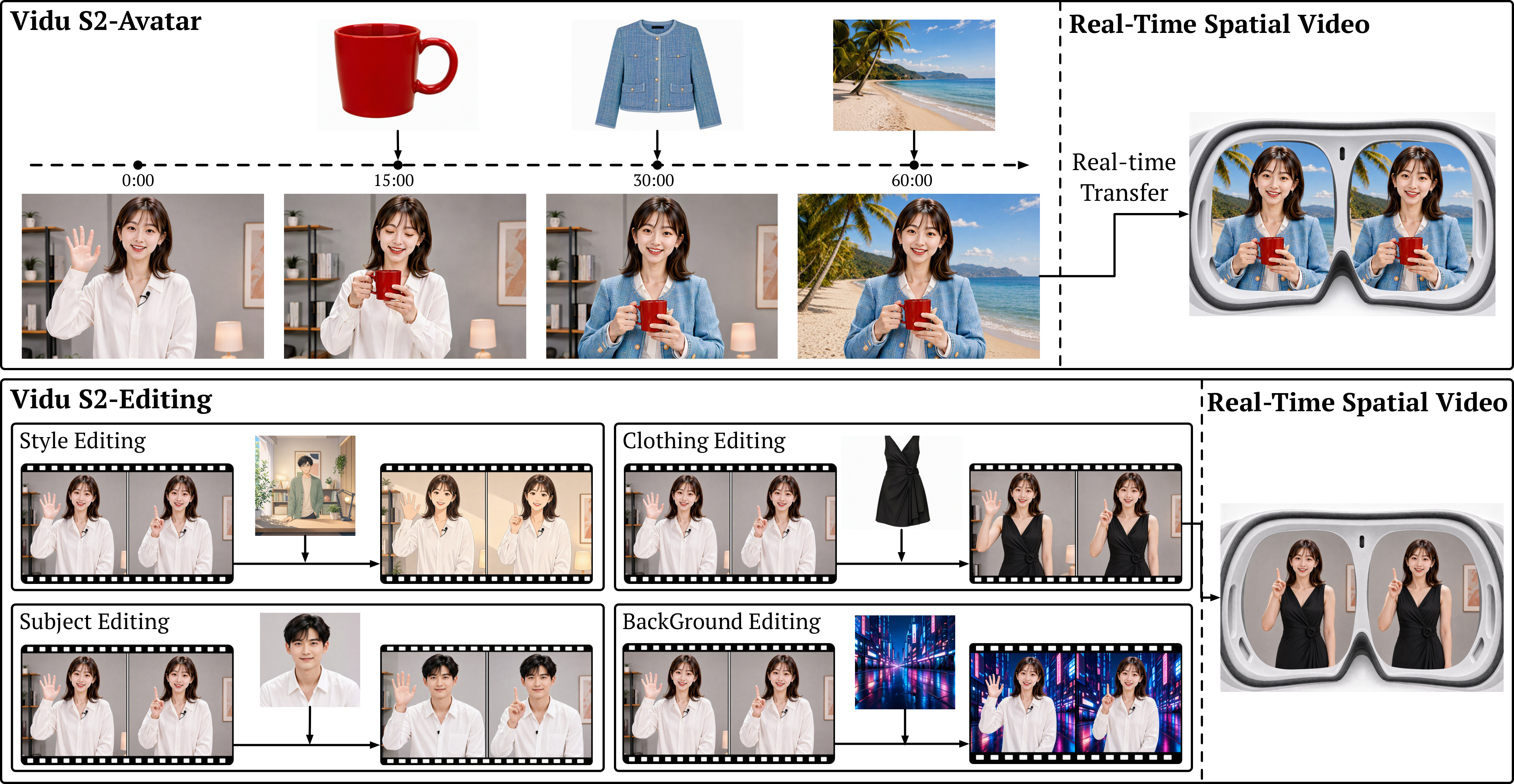
What is Vidu S2?
The technical report, Vidu S2: Real-Time Interactive, Editable, and Spatial Video Generation, was submitted to arXiv on September 10, 2026. ShengShu launched the product on September 15; its English announcement followed on September 16. The central idea is a continuous video stream that keeps responding to speech, text, reference images and incoming video.
| Item | Status as of September 21, 2026 |
|---|---|
| Developer | ShengShu Technology |
| Models | Vidu S2-Avatar / Vidu S2-Editing |
| Avatar output | 720p; paper-reported generation throughput of 25–42 FPS |
| Interaction | Live conversation, motion instructions, full-body movement, dynamic references |
| Editing | Style transfer, virtual try-on, subject and background replacement |
| Spatial video | Stereo research demonstrations; not a confirmed standard public API |
| Access | Published API documentation and an official online demo |
| Weights | No public S2 checkpoint found; a GitHub project is not an open-weight release |
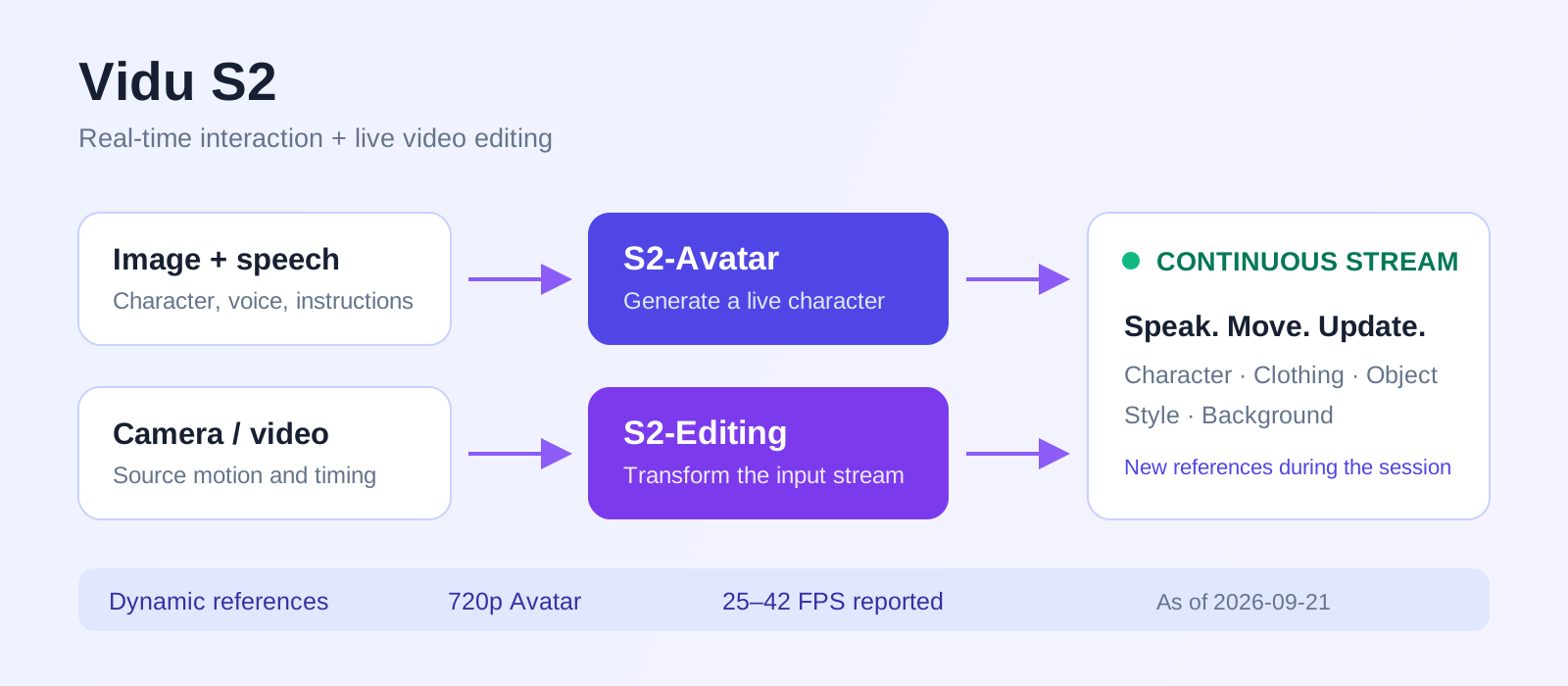
S2-Avatar: conversation and full-body interaction
Start with a character image and generate a character that speaks and moves continuously. Instructions extend beyond facial expressions and waving to standing up and dancing. Official experiences cover real people, animated characters and pet-like characters. Appearance and action changes take place within the ongoing stream.
| Capability | Example interaction |
|---|---|
| Live conversation | Continue a video conversation through speech or text |
| Motion control | Ask the character to stand, wave or dance |
| Object interaction | Upload a cup or product image and ask the character to hold and describe it |
| Outfit changes | Introduce a clothing reference while the character is speaking |
| Scene changes | Upload a café reference and move the character into that setting |
| State persistence | Keep holding the cup while smiling and continuing the conversation |
These are demonstrated capabilities, not a guarantee for every reference, action or session duration. Validate your own characters, products and interaction scripts before relying on them in a live application.
A character turns and moves her arms in a continuous motion sequence. Prerecorded official preview.
A character picks up and puts on sunglasses, demonstrating accessory interaction. Prerecorded official preview.
These clips come from the official promotional page. Cards show actual file dimensions and duration; prerecorded previews do not measure interaction latency or establish raw API output specifications.
Vidu S1 vs Vidu S2
| Feature | Vidu S1 | Vidu S2 |
|---|---|---|
| Resolution | 540p | 720p Avatar output |
| Real-time generation | Supported | 25–42 FPS reported in the paper |
| Talking characters | Supported | Stronger expression and motion |
| Large body movements | Limited instruction following; dancing is difficult | Improved full-body motion and dance |
| Runtime reference updates | Reference fixed after the stream starts | Dynamic reference images |
| Clothing and object interaction | Constrained by fixed references and motion limitations | Introduce clothing, objects and scenes during generation |
| Incoming video editing | Not supported | S2-Editing |
| Spatial video | Not presented as an S1 capability in this report | Real-time spatial video research |
720p, 25–42 FPS and interaction latency
S2-Avatar uses a low-resolution backbone for motion and temporal structure, followed by a single-step super-resolution refiner for finer appearance details. This separates long-range temporal work from the restoration of faces, clothing and texture at 720p.
Low-resolution backbone
  → Single-step super-resolution refiner
→ 720p video streamMeasure time to first frame (TTFF), speech-to-response delay, interruption recovery and reference-switching delay separately. Paper results do not establish latency for your deployment region and application pipeline.
Self-Replay Forcing and long-stream stability
Autoregressive video uses previously generated segments to condition future segments. Small mistakes can compound into identity changes, clothing drift or unstable backgrounds. Self-Replay Forcing (SRF) exposes training to the imperfect histories the model produces during actual inference.
- Run a long autoregressive rollout with the current model, following its inference procedure.
- Add noise to self-generated segments and replay them causally, using the model’s own imperfect history.
- Train through the replay so losses can propagate across replayed segments, without retaining the original rollout’s full backward graph.
The aim is to reduce accumulated error and improve long-duration stability. It is not a promise of unlimited, drift-free interaction.
S2-Editing: transform a live camera or video stream
Editing receives existing video and changes its appearance using instructions and optional reference images. When the input person turns, raises an arm or moves, the output is intended to follow the same motion and timeline.
| Editing Type | Function | Example |
|---|---|---|
| style_transfer | Change the visual style | Render camera footage as anime or watercolor |
| virtual_tryon | Change clothing | Apply a white jacket from a reference image |
| subject_replacement | Replace the subject | Use a reference character’s appearance |
| background_replacement | Replace the environment | Introduce a new background reference |
How Frame-Aligned Attention preserves motion
Each target frame reads the source frame at the same time step, while reference conditioning remains available across frames. This anchors pose, expression, camera motion and timing to the input while changing appearance. Hands, occlusions and garment boundaries still need inspection in actual outputs.
References and scenarios can change during a live session, such as switching from a white shirt to a denim jacket. The API describes changes taking effect within a few seconds; a runtime update does not imply an instant next-frame transformation.
A character in a street scene transitions through pixel-art and anime appearances. Prerecorded official preview.
The character remains in the scene while her clothing changes during the demonstration. Prerecorded official preview.
Dynamic references and the VLM Agent
Conventional reference-to-video starts from a fixed reference and ends with a completed clip. S2 lets people introduce character, garment, product or scene references while generation continues.
Reference A → Continuous stream
                    ↓ Instruction + Reference B
               Update action / appearance
                    ↓ Reference C
               Continue and preserve state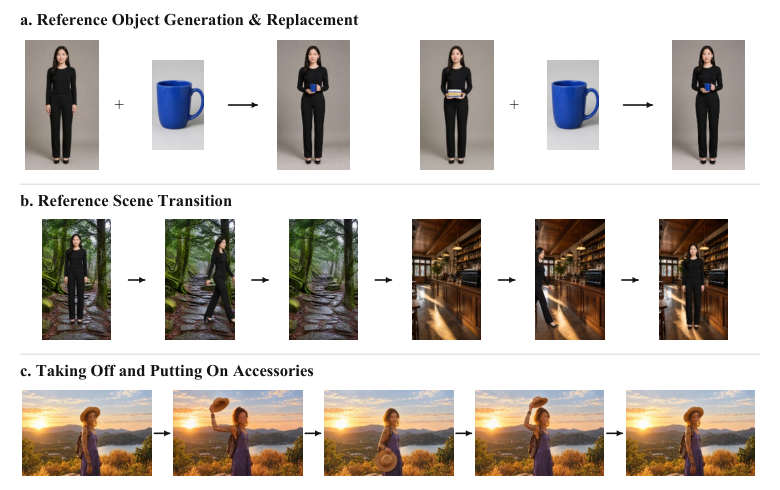
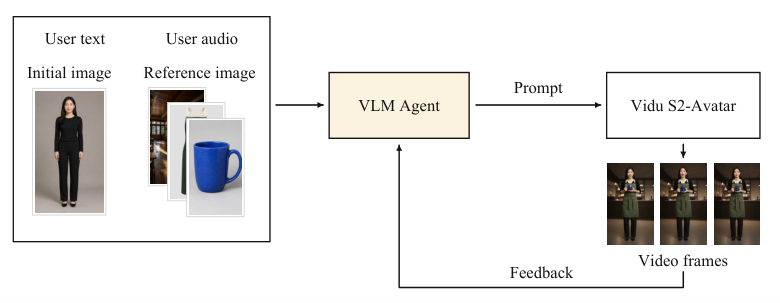
The official system also uses a VLM Agent to interpret instructions and references, formulate motion prompts, inspect the generated video and adjust subsequent prompts. If picking up a cup is incomplete, it can refine the instruction; once completed, it tracks the held-object state.
Spatial video: synchronized left and right views
The report explores converting generated or edited video into left- and right-eye views for VR headsets. Monocular streams can be edited or generated first, then passed through depth estimation and stereo warping. Existing stereo input can instead be edited jointly and split back into paired views.
Mono: generate / edit → depth estimation → stereo warping → left / right views
Stereo: paired input views → joint editing → left / right output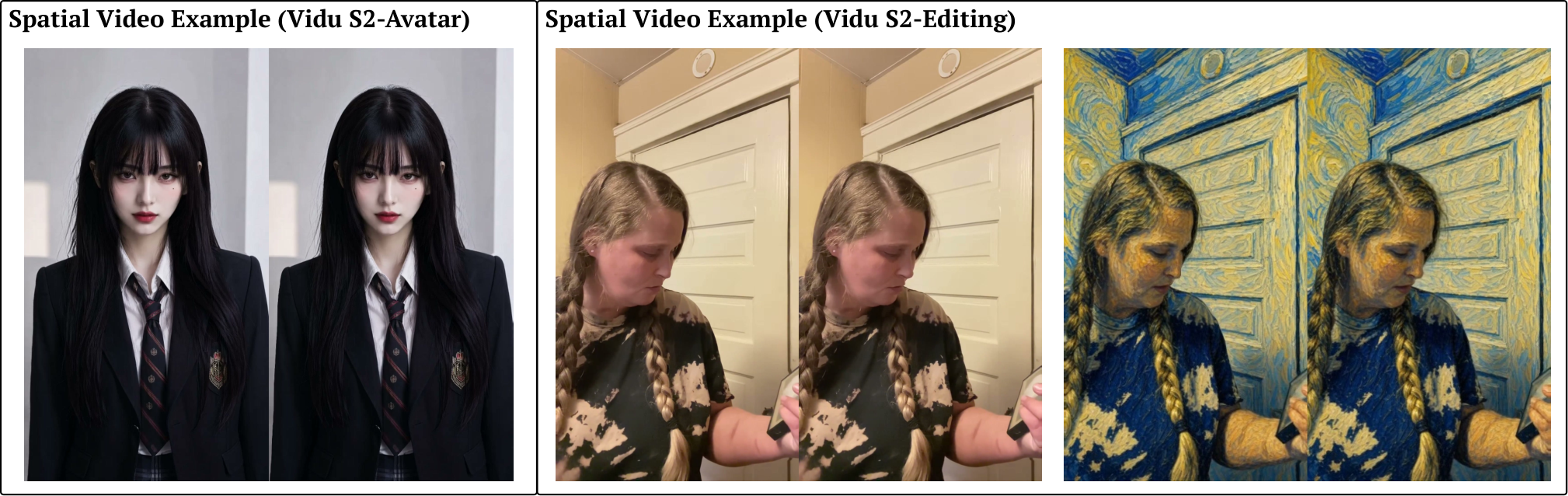
Possible applications include VR, AR, XR, spatial computing, AI companions and NPCs. As of this guide’s date, treat this as research and demonstration capability: a standard public Spatial API comparable to the Avatar and Editing APIs has not been confirmed.
Official benchmark results
StreamAV-Bench · Avatar
S2-Avatar has the best values in all nine reported columns of the paper’s Table 1. This excerpt shows five metrics covering visual appearance, synchronization and consistency.
| Model | Visual Aesthetics ↑ | Visual Quality ↑ | AV Sync ↓ | Subject Consistency ↑ | Background Consistency ↑ |
|---|---|---|---|---|---|
| Live Avatar | 0.661 | 3.295 | 1.145 | 0.997 | 0.989 |
| Self-Forcing | 0.585 | 2.753 | 0.919 | 0.981 | 0.969 |
| Vidu S2-Avatar | 0.687 | 3.370 | 0.617 | 0.998 | 0.993 |
Lower AV Sync is better. It measures audio/video synchronization error, not conversational response latency. Consistency scores are not long-session success percentages.
Sparkle-Bench · Editing
| Model | Overall ↑ |
|---|---|
| Kiwi-Edit 5B | 3.57 |
| Decart Lucy 2.5 | 3.67 |
| Vidu S2-Editing | 3.74 |
OpenVE + RefVIE · Editing
| Model | Joint Overall ↑ |
|---|---|
| Bernini-R 14B | 3.92 |
| Vidu S2-Editing | 4.26 |
ViViD test set · Virtual try-on
| Model | VFID_I ↓ |
|---|---|
| ViViD | 21.8032 |
| CatV²TON | 19.5131 |
| Vidu S2-Editing | 9.9515 |
Lower VFID_I indicates a smaller distance between generated and reference video feature distributions. Practical try-on evaluation should also inspect garment texture, motion and hand–clothing occlusions.
Vidu S2 vs HeyGen and Runway
The internal paired preference study compares S2 with Runway Character GWM-1, PixVerse Image Avatar and HeyGen. The authors report overall preference of 85.7% against Runway and 100% against PixVerse and HeyGen. Those percentages describe the evaluated comparisons under that protocol.
The paper describes 20 trained evaluators for its internal studies. Some percentages move in 14.3-point increments, but that alone does not establish the full sample size, aggregation procedure or confidence interval. These are not universal win rates.
For a buying decision, use matching characters, speech, instructions and session lengths. Compare first-frame delay, response latency, interruption recovery, identity stability and actual cost. The reported results support competitiveness, not a claim that S2 replaces every HeyGen or Runway workflow.
Vidu S2 API: four integration modes
| Mode | What Vidu supplies | Typical use |
|---|---|---|
| Avatar Real-Time | An integrated RTC, ASR, LLM, TTS and Avatar rendering pipeline | Rapid companion, tutor, support or sales applications |
| Avatar Component | Audio and motion input → generated Avatar stream | Bring your own LLM, ASR, TTS and RTC |
| Avatar Offline | Image + audio / text + action timeline → MP4 | Batch presentations, presenters and ads |
| Editing | Incoming stream → live edited stream | Filters, try-on, VTubers and camera applications |
User speech → ASR → LLM → TTS → Avatar rendering → RTC video
Integrated pipeline supplied by ViduYour ASR / LLM → Your TTS → Audio + motion control
↓
Vidu S2 Avatar
↓
Your RTC applicationComponent can be integrated with your chosen language and speech services, such as DeepSeek, GPT, Claude or ElevenLabs. This describes an integration pattern, not a claim of a joint official offering from those providers.
RTC, audio and WebSocket requirements
Component documentation lists Alibaba ARTC, Tencent TRTC, Agora and Volcano Engine RTC. WebSocket carries audio, interruption, transcription and control messages; RTC transports the real-time media.
| Audio setting | Documented requirement / recommendation |
|---|---|
| Encoding | PCM s16le |
| Sample rate | 24 kHz |
| Channels | Mono |
| Recommended audio frames | 20 ms / 100 ms |
A browser client can use a session client_secret for WebSocket access and an RTC SDK to publish or subscribe to streams. Keep long-lived API credentials on the server and issue client session credentials through your backend.
Editing API and live streaming
Camera / source video → RTC → Vidu S2-Editing
                                     ↓
                              Edited video → RTC / RTMP
The Editing API exposes rtmp_urls for relaying output to multiple RTMP destinations. This can feed YouTube Live, Twitch, commerce systems and other platforms that accept RTMP, subject to the destination’s streaming permissions and valid ingest configuration.
Reference and scenario updates need transition handling in the application. Do not assume each change is applied to the next frame.
Vidu S2 API pricing
International API list prices below are a September 21, 2026 snapshot. One credit costs US$0.005. Per-minute figures are the per-second rate multiplied by 60. Taxes, capacity and separately integrated LLM, speech, RTC or storage services are additional.
| Mode | Credits / second | USD / second | USD / minute |
|---|---|---|---|
| Avatar Real-Time | 1.5 | $0.0075 | $0.45 |
| Avatar Component | 1 | $0.005 | $0.30 |
| Avatar Offline | 1 | $0.005 | $0.30 |
| S2-Editing | 1 | $0.005 | $0.30 |
For Real-Time Avatar, the first 10 voice clones are free. Each additional clone is 899 credits: US$4.495, approximately US$4.50. This is the voice-cloning policy in the S2 pricing section.
Concurrency: the first five sessions and extra capacity
At that list rate, adding a sixth concurrent slot adds US$2,080 per month before video usage. Concurrency means simultaneous sessions, not registered users. The table groups this policy under S2; confirm shared allowances, mode applicability and any enterprise terms with Vidu.
Total ≈ Billable seconds × Mode rate
      + Extra concurrent-session capacity
      + Your LLM / TTS / ASR / RTC / storage costs
      + Applicable taxes
Offline Avatar and action timelines
The offline mode combines an image, audio or text, and timed actions into an MP4. It fits presenters, teachers, product explainers, UGC ads and batch short-form production.
{
  "text": "Welcome to our channel",
  "timeline": "{\"actions\":[{\"text\":\"smile and wave\",\"time_range\":[2,10]}]}"
}
The API expects timeline as a serialized JSON string, not a nested JSON object. A complete request also needs the image, model and other documented fields. Result URLs expire after approximately 24 hours by default, so download completed outputs into your own storage.
Demo, free access, iframe embedding and weights
The official demo is at vidu.com/vidu-stream. Custom characters require sign-in, account verification and a photo upload. No stable public entitlement of a fixed number of free S2 minutes per day was found; use the account’s current trial information.
No official public S2 iframe embed API was found as of this guide’s date. The documented developer path is REST, WebSocket and RTC SDKs. Embedding a consumer demo page is not equivalent to a supported production integration.
The official Vidu-S repository provides project information, papers and related links. No public S2 checkpoint was found, so it should not be described as a free local model download.
Vidu S2 vs Q3 and other video models
| Product path | Main workflow | Useful comparison criteria |
|---|---|---|
| Vidu Q series, such as Q3 | Text / image / reference / first–last frame → completed clip | Image quality, camera language, duration, offline cost |
| S2-Avatar | Speech + instructions + dynamic references → interactive character | Latency, motion, interruption recovery, identity and state |
| S2-Editing | Camera / source stream + edit conditions → continuous output | Motion preservation, appearance edits, switching delay, consistency |
The familiar finished-clip workflows of Veo, Sora, Wan and Seedance are more naturally compared with Q-series generation on a specified task. Judging S2 only by the beauty of a five-to-ten-second clip misses its continuous interaction focus. Always identify the product version and mode being compared.
Three useful ideas are streaming, stateful and interactive: playback begins while generation continues; characters need to retain identity, clothes and held objects; and new voice, text, images or camera input can arrive during the session. Treating generated video as an interface is this guide’s product interpretation.
Potential applications
| Application | Potential value |
|---|---|
| AI companions / character chat | Continuous video conversation with expressions and actions |
| AI tutors / animated learning characters | Combine explanations with live character performance |
| Video support / sales assistants | Answer questions and demonstrate referenced products |
| Live commerce / virtual try-on | Update clothes and product references during a session |
| VTubers / AI cosplay | Drive generated appearances from real movement |
| Game NPCs | Explore speaking, moving characters with persistent interaction state |
| Live filters | Change style, subject or background in an input stream |
| Spatial computing / VR | Explore stereo characters as the research becomes productized |
Limitations and what to watch next
- 720p can suit mobile interaction, but leaves a gap for high-resolution broadcasts, 4K displays and film workflows.
- Generation throughput does not establish end-to-end voice interaction latency.
- Identity, object and environment persistence still need long-session testing; reference changes also take time.
- Large deployments must budget for both usage and concurrent capacity. A low per-second rate is not a total-cost estimate.
- Weights remain unavailable and Component carries a beta label. Access and interfaces may evolve.
- Most cited benchmarks and preference results are author-reported and need more independent long-duration validation.
| Metric / development | Why it matters |
|---|---|
| 1080p Avatar / Editing | Higher-quality interaction and broadcast workflows |
| TTFF / interaction latency | First impression and conversation responsiveness |
| Reference switching latency | Natural clothing and scene transitions |
| State / object / environment persistence | Long-term identity, product and scene continuity |
| GPU / session cost and concurrency pricing | Deployment economics and margins |
| Multiple characters / camera control | Richer interactions, NPCs and camera behavior |
| Spatial API / Web SDK | Availability of spatial applications and easier integration |
These are tracking priorities, not announced features or release dates. For companion and NPC applications, state persistence and interaction latency deserve early measurement.
FAQ
- Is Vidu S2 a conventional AI video generator?
- Its main focus is continuous video: Avatar generates interactive characters and Editing transforms input streams. Offline Avatar also produces completed MP4 files.
- How much does the Vidu S2 API cost per minute?
- At the September 21, 2026 international list rate, Real-Time Avatar is about US$0.45 per minute. Component, Offline and Editing are about US$0.30 per minute, before capacity, external services and taxes.
- Do five free concurrent sessions mean free video generation?
- No. The first five slots have no capacity charge, but usage is still billed. An additional slot is listed at 416,000 credits, or US$2,080, per month; confirm applicable terms for your mode.
- Does 25–42 FPS mean a roughly 24ms response?
- No. FPS is generation throughput. End-to-end speech interaction includes ASR, the LLM, TTS, video generation and RTC, and must be measured separately.
- Can I embed a free Vidu S2 iframe?
- No official public S2 iframe embed API was found. The documented integration uses REST, WebSocket and RTC SDKs; a demo trial is not a fixed free-service commitment.
- Is Vidu S2 open source or available to run locally?
- No public S2 weights were found as of this guide’s date. The official project repository does not substitute for downloadable checkpoints and local inference code.
- Is Vidu S2 better than HeyGen or Runway?
- The authors report strong internal preference results, but those are not universal win rates. Compare latency, motion control, stability, interruption recovery and costs using matching inputs.
- Is there a public Spatial Video API?
- The report demonstrates spatial generation and editing, but a complete standard public Spatial API has not been confirmed. Research demonstrations should not be treated as available endpoints.


